
Getting started
What is Yoke?
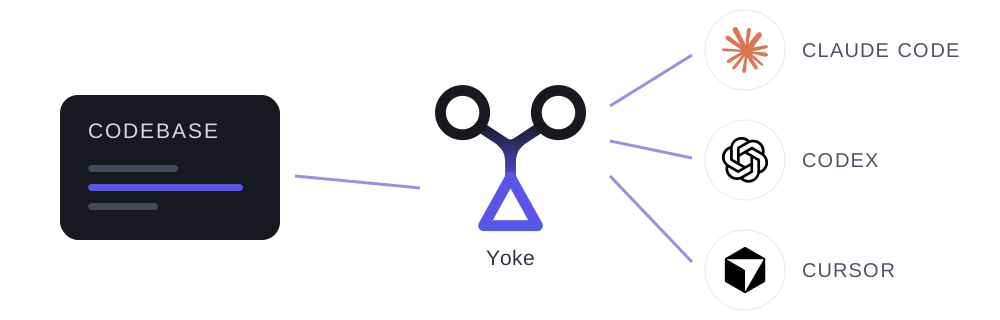
Yoke is a control plane for agentic engineering that gives humans and coding agents one shared source of truth for strategy, planning, implementation, testing, and deployment. You set the direction, and Yoke gets it done quickly and correctly.
Installation and setup
Open Claude Code, Codex, or Cursor and say:
install upyoke.comYour agent handles installation and guides you through setup, helping you make the right configuration choices.
Once setup is complete, your agent will launch the /yoke onboard skill. During onboarding, your agent reviews your project and existing work, helps you write your strategy and choose what to tackle first, and configures what's needed to test and deploy your project.
After /yoke onboard, your agent uses Yoke to organize work, staff it across your available machines and coding agents, and deliver it. It keeps you informed and brings key decisions to you.
Hosting modes
A universe is the home for your Yoke projects, work records, and configuration. Each project brings together its software, goals, and work. You can keep several projects in one universe.
Choose where your Universe lives during setup:
Local
On your computer (best for solo dev machine)
Self-hosted
You host your Universe (best for teams & multiple machines)
Hosted
Private betaWe host your team's Universe (easiest setup and updates)
You can move a universe between these options using export and import.
Team collaboration
You can use Yoke solo, including from multiple machines. In self-hosted and hosted modes, you can also invite everyone on your team to connect to the shared Universe. When multiple humans collaborate, Yoke is even more powerful, coordinating work in real time across all active users, machines, and harness sessions.
Yoke web dashboard
The web dashboard gives you a shared view of your Universe: projects, strategy, work items, agent sessions, QA, and deployments. Use it to follow progress, review evidence, and respond to questions and approvals.
Local & self-hosted
Run in your Terminal:
yoke ui upHosted
Strategy docs
Strategy documents are markdown text stored in your Yoke Universe’s database that you and your agents can create, edit, and archive.
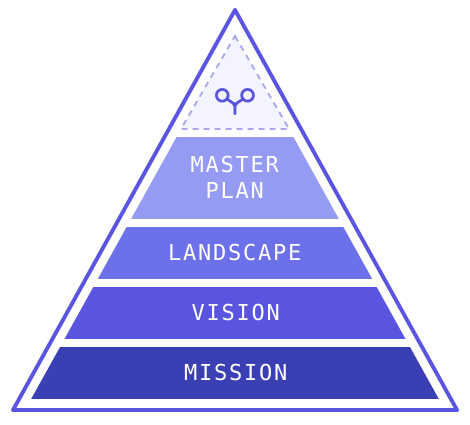
Standing strategy docs
MISSION, VISION, LANDSCAPE, and MASTER-PLAN are “standing” docs that give humans and agents a shared understanding of the foundational context in which a project operates.
Working strategy docs
CURRENT-PLAN and other “working” strategy docs you create hold major initiatives, big slices of work, and ideas not yet filed as work items. Your agent files work items to track implementation and delivery, keeping the strategy doc updated with what’s filed, what remains, and current progress.
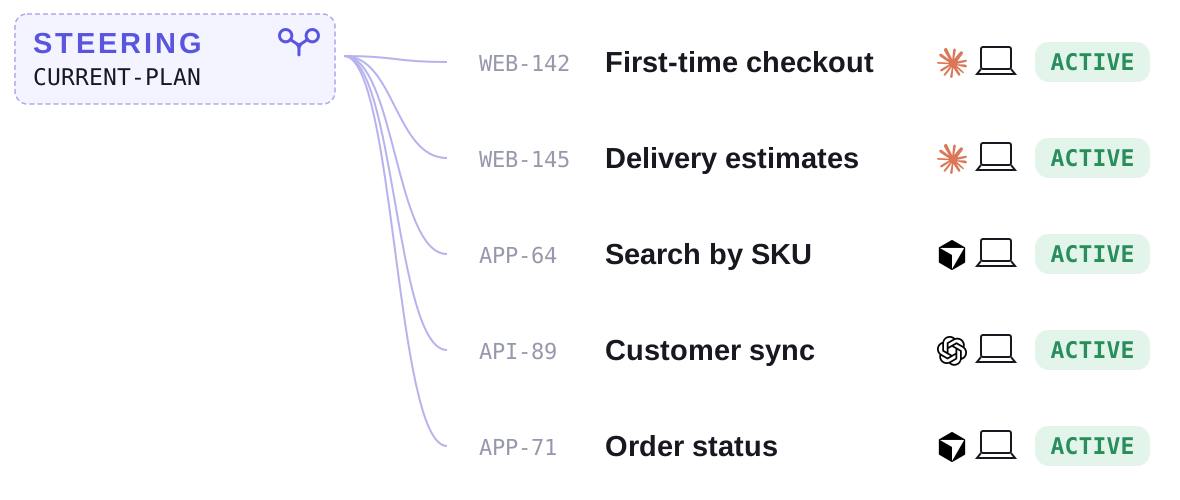
Work can be safely stopped and resumed anytime, from anywhere, without loss of any critical context.
Steering and fleet control
Your coding agent uses Yoke to take a  STEERING seat claim for one or more projects and working strategy docs. It files work items, staffs them on an available harness on your machine or another connected machine, and orchestrates delivery. You stay in the conversation to guide the work and make key decisions.
STEERING uses Yoke to launch parallel CLI sessions across all available machines and coding harnesses. Fleet messaging allows STEERING to communicate in real time with other sessions, and ensure coordinated execution and delivery.
STEERING
CURRENT-PLAN
STEERED
CURRENT-PLAN
STEERED
CURRENT-PLAN
STEERED
CURRENT-PLAN
Workflows and work items
A workflow defines the stages work moves through, from an idea to delivery, and the checks required to move forward. Your agent chooses a workflow suited to the work, from a small change to a major initiative.
A work item is a piece of work following that workflow. It records what needs to be done, its plan and progress, and the evidence that it meets its goals.
- Idea Complete
- Planning Complete
- Implementation Current stage
- Review Next
- Release Next
- Done Next
Yoke ships with Dash, Issue, Epic, and Blitz workflows, each with different stages and gates, the checks required to advance. Execution posture settings control requirements such as verification, work isolation, and delivery. You can configure human approvals and default execution levels for stages, which determine the models and effort agents use.
The Frontier
The Frontier is the ever-evolving set of actionable, filed work items that Yoke can move through their workflows. Its dependency graph connects items with edges that explain what must happen before other work can start, merge, or finish. These relationships can span projects and reveal which work unlocks the most progress.
Yoke’s scheduler uses priorities, dependencies, workflow requirements, and existing work claims to determine what can advance next. Steering coordinates that work across your fleet, while /yoke charge lets you pick up work directly. The Frontier dashboard page shows what’s ready, active, or waiting, and why.
Execution instructions
Execution instructions are snippets of custom project-specific context that you and your agents configure through Yoke to reach the right agent at exactly the right time (following the principle of progressive disclosure). They can capture conventions, constraints, reminders, or procedures, scoped to selected projects, workflows, and workflow stages.
Manage instructions through your agent or the Workflows dashboard page. /yoke onboard will help you set them when you get started.
Quality assurance
With Yoke, you don't need to test everything yourself or engage in seemingly endless iteration cycles. Agents add appropriate QA check requirements to all work, specifying what must pass and when. Yoke has built-in QA methods ranging from deterministic to fully agentic, running locally and on external test machines.
QA cases are grouped into plans that can be easily copied, tweaked, and reused. Over time, your project becomes bulletproof. QA can run before merge, after merge, or after deployment, and against preview, ephemeral, dev, staging, or Production environments.
Yoke records each attempt’s results and evidence, tracks failures through correction and rechecking, and enforces required checks before work advances. Where human approval is configured, you can review the QA evidence e.g. screenshots and approve through the Yoke web dashboard.
Review checkout
Agent said: All three checks passed. Please review the checkout evidence.
Deployments and releases
Work items that require deployment reach Done through a deployment run of their assigned flow. That flow defines the target environment and the steps required to complete delivery, including CI checks, GitHub Actions workflows, deployment commands, QA checks, and human approvals.
Environments represent where your software runs, such as preview, staging, and Production. A flow is the reusable definition; a run is one execution of it. A run can deliver several work items together, tracking each item’s required QA and delivery state.
Yoke records the release candidate, stage results, and evidence of what was deployed. You can follow progress in the web dashboard, respond to approvals, and see which work reached each environment. If a step fails, the run records the failure so your agent can diagnose it and recover.
Storefront production release
Deploy checkout changes, verify Production, and complete delivery.
Pipeline
-
1
merged Confirm the changes are merged
-
2
deploy Deploy the storefront
-
3
warm-up Check Production is ready
-
4
item-qa Verify each item in Production
-
5
complete Record delivery
Recent run
Databases and migrations
Yoke can bring database changes into your project’s delivery process, with migration rehearsals, compatibility checks, and records of what was applied.
During /yoke onboard, your agent can register your project’s database and migration settings, or defer them until needed. Database access, a separate database for testing migrations, and integration with your deployment process require project-specific setup that your agent can help complete. Once configured, agents can rehearse database changes before release.
Operations and troubleshooting
Yoke helps your agents find and fix problems. Doctor checks project health, while events, logs, and performance diagnostics help explain failures and slow operations. Agents can also diagnose connection problems and recover Yoke’s background services.
Ouroboros, Yoke’s learning loop, lets agents record problems as feedback, identify recurring issues, and turn those findings into improvements.